


Most advice about a gaming chair with leg rest gets this backwards. Buyers see a padded foot support and assume they're getting better ergonomics, when the story is usually seat fit, recline geometry, and whether the chair matches their body.
That matters because the category isn't a tiny novelty corner anymore. The global gaming chair market has climbed from roughly USD 1.4 billion in 2023 to about USD 1.78 billion in 2026, with forecasts ranging up to USD 2.56 billion by 2031 and even USD 3.91 billion by 2034 depending on methodology, while CAGR estimates sit between 6.4% and 9.02% (Mordor Intelligence). In plain English, comfort features are no longer decorative.
| Quick take | Built-in leg rest | Standalone footrest |
|---|---|---|
| Best for | Reclined lounging, console setups | Flexible desk setups, mixed users |
| Biggest risk | Seat-depth mismatch | Another item to manage on the floor |
| Adjustment range | Usually limited by the chair design | Usually easier to fine-tune |
| Repair headache | Higher, because it's part of the chair | Lower, because it's separate |
| My verdict | Good if the chair already fits you | Better if you care about fit and flexibility |
Table of Contents
- Why a Leg Rest Might Not Be the Upgrade You Expect
- Key Features That Define a Quality Gaming Chair With Leg Rest
- Built-In Leg Rests Versus Standalone Footrests
- How to Decide If a Leg Rest Fits Your Setup
- Top Gaming Chair Models and Configurations Compared
- Situational Recommendations for Different Gamers
- Setup Tips and Maintenance for Long-Term Comfort
Why a Leg Rest Might Not Be the Upgrade You Expect
A gaming chair with leg rest sounds like an automatic comfort upgrade, but that's only true when the chair fits your frame and your posture. The hidden problem is seat depth mismatch. Ergonomic guidance from specialist coverage points out that gaming-chair seat pans are often about 20 inches deep, while office-ergonomics guidance recommends roughly 16.25 to 18.25 inches for many users, because a seat that's too deep pushes shorter people forward and stops them from using the backrest properly (Taylor Ergo). A leg rest doesn't fix that. It can hide it.
Recline changes the load, not always for the better
Once you lean back and raise your legs, the whole chair geometry changes. If the backrest reclines without good lumbar positioning, you can end up with a gap behind the lower back or a neck angle that feels fine for ten minutes and miserable later. That's why recline angle alone is a weak selling point. A chair that reclines fully but fits poorly is still a bad chair.
Practical rule: if the seat pan forces you to perch forward, the leg rest is lipstick on a bad fit.
Independent testing backs up the skepticism. The retractable leg rest on the Boulies Master Rex was described as padded but mechanically imperfect, with wobble when extended, a catching slide mechanism, and a short reach that stopped at the calves rather than supporting the whole lower leg (TechRadar). That's the trap. The feature looks premium, but the support stops short where it matters.
The test isn't whether the leg rest exists. It's whether the chair lets you sit upright when you need focus, recline when you want to relax, and transition between both without fighting the frame. If the answer is no, you're paying for a gimmick that distracts from the parts of the chair that protect your back.
Key Features That Define a Quality Gaming Chair With Leg Rest
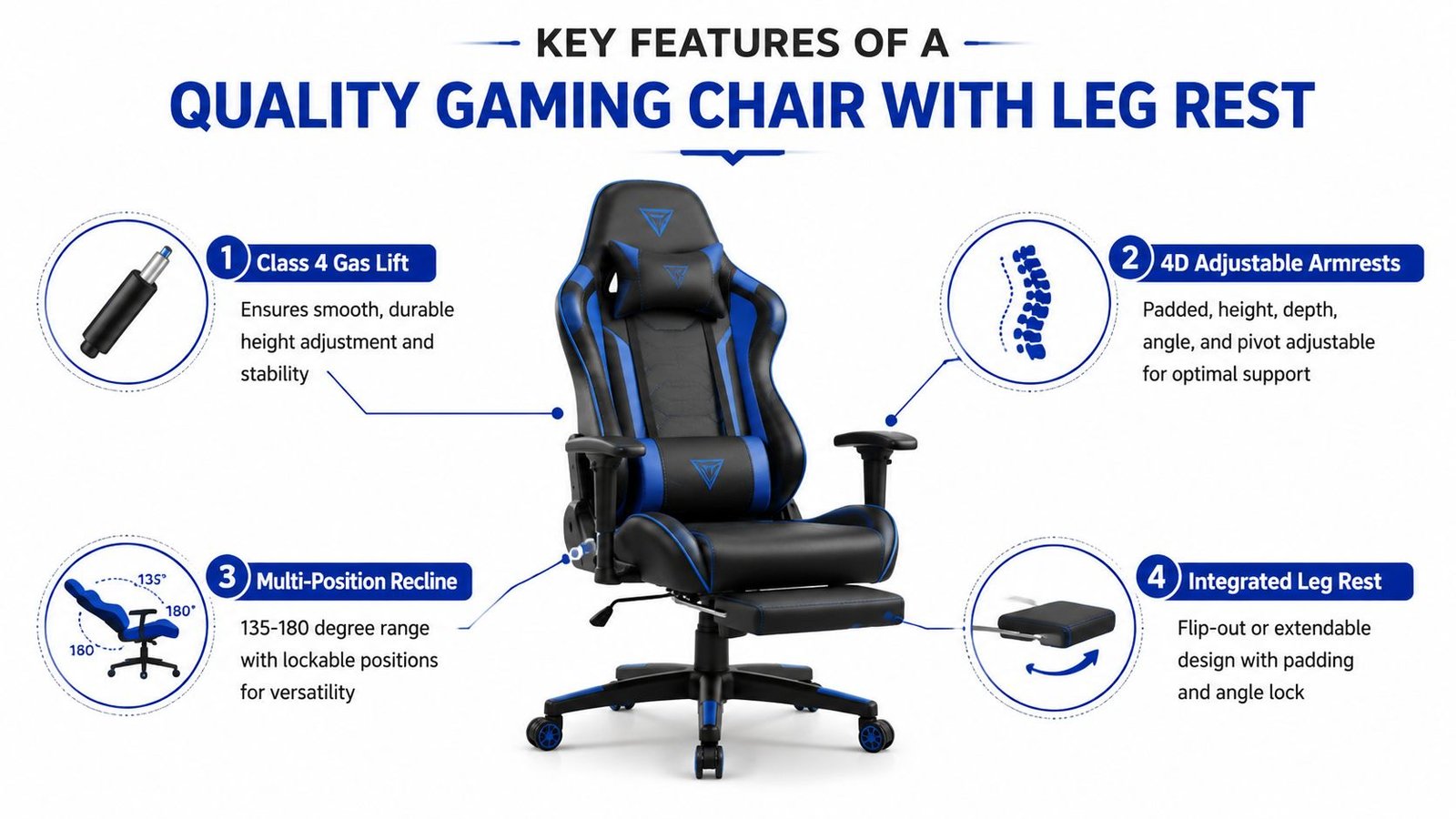
A good chair with a foot support mechanism isn't defined by one flashy part. It's defined by how the leg rest, recline system, armrests, and seat pan work together under load. That's especially important in a market where design has moved from racing-seat inspiration and office-ergonomic ideas into a mainstream gaming form factor, with posture support and adjustable comfort now treated as baseline expectations (DXRacer, Mordor Intelligence).
Mechanism quality beats marketing language
The best integrated designs don't just flip out once and hope for the best. They extend smoothly, lock cleanly, and retract without fighting you. That matters because a sloppy hinge becomes annoying fast, and a sloppy foot platform is worse than no platform at all.
A useful benchmark comes from standalone gear. Secretlab's OTTO Legrest was reviewed with three-way adjustability, height ranging from 15.4 to 18.5 inches, and five incline positions at 0°, 7.5°, 15°, 22.5°, and 30°, which shows how much better a foot-support accessory can work when adjustment is the point instead of an afterthought (Igor's Lab). That kind of range is what built-in models usually lack.
Recline and support should move together
A quality chair needs a recline system that matches the leg rest. If the back leans far enough but the foot support sits at the wrong angle, your pelvis slides and your shoulders compensate. You feel that as pressure in the lower back, then in the neck, then in the hips.
Look for these traits together:
- Smooth extension, not a jerky pull-out motion.
- Padded contact surface, so your calves aren't resting on a hard edge.
- Lockable positions, so the rest doesn't drift under load.
- Recline control, so you can choose upright play or relaxed lounging without one mode breaking the other.
- Stable hardware, because wobble at full extension kills confidence fast.
The best chairs don't try to be everything at once. They give you a controlled recline, a leg rest that doesn't wobble, and enough adjustability to fit your build. That's the difference between a premium comfort chair and a flashy seat with one useful afternoon in it.
Built-In Leg Rests Versus Standalone Footrests
Most buyers need to stop thinking about style and start thinking about use case. A built-in leg rest is convenient, but a standalone footrest is often more honest about ergonomics because it separates body support from chair design. That separation matters when your chair already fits well and you just need better lower-leg positioning.
| Built-In vs Standalone Leg Rest Comparison | Built-In Leg Rest | Standalone Footrest |
|---|---|---|
| Adjustability | Usually tied to the chair's own angles | Easier to reposition independently |
| Fit flexibility | Limited by the seat and frame | Works with more chair types |
| Space use | Cleaner look, fewer loose pieces | Takes extra floor space |
| Repair risk | More moving parts in one unit | Easier to replace if worn |
| Best scenario | Dedicated lounge or console setup | Shared desk or mixed-use setup |
Convenience has a price
The built-in option wins on simplicity. You pull it out, lean back, and you're done. That's useful for console gamers or anyone who wants a one-chair solution without extra furniture.
But convenience can hide a bad fit. If the seat is too deep, the leg rest may make the chair feel supportive even when the back isn't doing its job. That's why built-ins can be overrated for people who sit upright most of the day, then game at night.
Standalone support is more modular
A separate footrest or ottoman gives you more freedom. You can pair it with a chair that already has proper lumbar support, better armrest geometry, and a seat depth that fits your thighs. That combination often beats an integrated design because each part does one job well.
Best use case for standalone support: you already own a decent chair and just want a better recline position without replacing the whole seat.
The downside is obvious. A separate unit takes space, can slide around, and adds clutter. In a small room, that matters. In a shared room, it matters even more. If you're constantly moving your setup or sharing the chair with someone else, modular gear is usually the smarter buy because you can adjust it instead of living with one fixed configuration.
The blunt verdict is simple. Buy built-in leg rests for convenience and lounging. Buy standalone support for fit and flexibility. If you care most about ergonomics, modular usually wins.
How to Decide If a Leg Rest Fits Your Setup
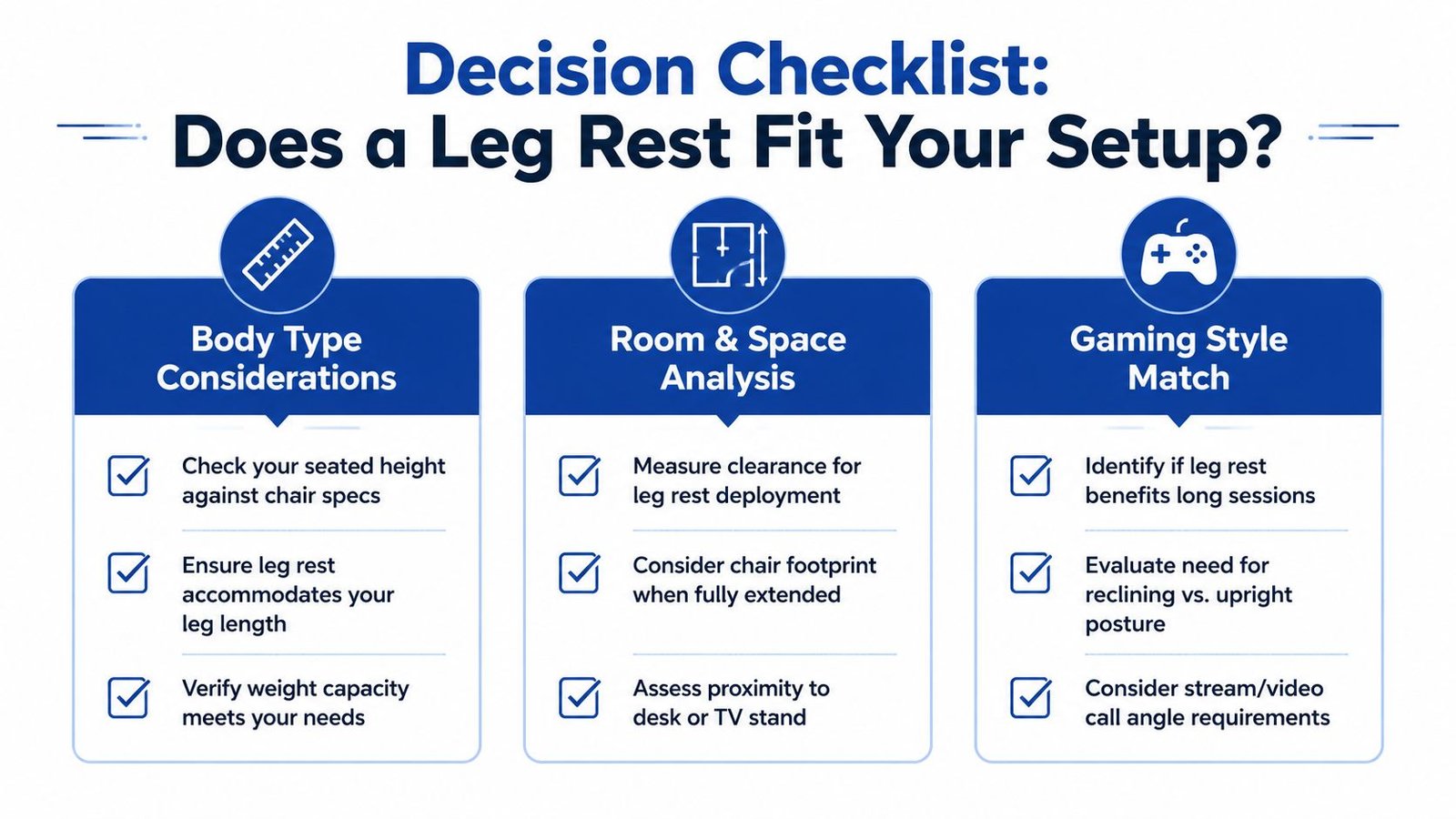
The first question isn't whether you want a leg rest. It's whether your body and room can use one properly. Taller users often need more support under the calves and feet than compact integrated rests can deliver, while shorter users can run into pressure behind the knees if the support extends too far or sits at the wrong height. A chair can look plush and still be wrong for your proportions.
Measure the room before you buy
A reclined chair with a deployed leg rest doesn't live in the same footprint as an upright desk chair. You need clearance in front of the chair, and you need enough room behind it to recline without hitting a wall or desk. If your setup is tight, the leg rest will spend more time stowed than used.
Match the chair to your gaming style
Competitive players usually sit upright and stay there. For that crowd, a leg rest is optional at best and dead weight at worst. Casual players and story-driven gamers are the opposite. They use recline, pause often, and benefit from a position that lets them relax without getting up.
Use this quick check before you spend more:
- Body fit: does the seat depth let your back use the backrest without your knees feeling crowded?
- Room fit: can the chair extend without hitting furniture or a wall?
- Usage fit: do you recline, or do you mostly stay upright?
- Alternate support: do you already own an ottoman or footrest that solves the problem?
- Desk compatibility: will a reclined posture still work with your monitor or TV height?
The best purchase is the one that matches reality, not the box art. If your play style is mostly upright, spend your money on better lumbar support and armrests. If you lounge, the leg rest can earn its keep.
Top Gaming Chair Models and Configurations Compared
The strongest pick for a lot of console-focused buyers is still the RESPAWN 900. It uses a continuous recliner-style design with an integrated extendable leg rest, a 135-degree recline, a 275-pound weight capacity, a cup holder, and a controller pouch. That's a real comfort chair, not just a racing seat with a pop-out gimmick, and its one-piece surface avoids the gap issues that plague some pull-out systems (RESPAWN guide).
The model comparison that actually matters
| Gaming Chair With Leg Rest Comparison Matrix | Model | Price Tier | Leg Rest Mechanism | Max Recline | Seat Depth | Best For | Key Compromise |
|---|---|---|---|---|---|---|---|
| RESPAWN 900 | Integrated recliner | Mid to premium | Continuous built-in support | 135 degrees | Not specified | Console lounging | Less suited to desk-first setups |
| RESPAWN 110 Pro | Retractable | Mid-range | Pull-out footrest | 130 degrees | Not specified | PC desk use | More traditional chair feel |
| RESPAWN Flexx | Retractable | Mid-range | Pull-out style | Not specified | Extended dimensions | Bigger users | More chair than recliner, depending on setup |
| Dowinx Gaming Chair | Retractable | Budget | Footrest plus pillows | 90 to 135 degrees | Not specified | Value shoppers | Less refined build |
| Hbada Gaming Chair With Footrest | Retractable | Budget to mid | Pull-out footrest | Up to 155 degrees | Claimed to fit 5'2" to 6' | Compact users | Limited adjustment range |
| Flash Furniture X40 | Retractable | Mid-range | Slide-out footrest | Not specified | Not specified | Mixed use | Wheel behavior and overall simplicity |
The RESPAWN 110 Pro makes more sense if you sit at a desk and want the footrest only sometimes. The RESPAWN Flexx is the better direction for larger frames because extended dimensions matter more than brand polish. The Hbada looks appealing on paper, but its claimed fit range tells you exactly who it's for and who should skip it.
The Dowinx and Flash Furniture X40 sit in the value lane. They can be fine buys if your expectations stay grounded. But cheap integrated rests often fail in the same place, by feeling serviceable instead of genuinely supportive.
The smartest alternative is sometimes not a leg rest chair
A quality reclining chair without a built-in leg rest, paired with a good standalone ottoman, can outperform a one-piece gaming chair. That's especially true if you care about seat depth, lumbar fit, and the freedom to adjust each piece separately. Integrated designs win on convenience. Modular setups win on actual ergonomics.
If you want my honest ranking, the best integrated option is the one that already behaves like a recliner first and a gaming chair second. That's where the category still gets interesting.
Situational Recommendations for Different Gamers
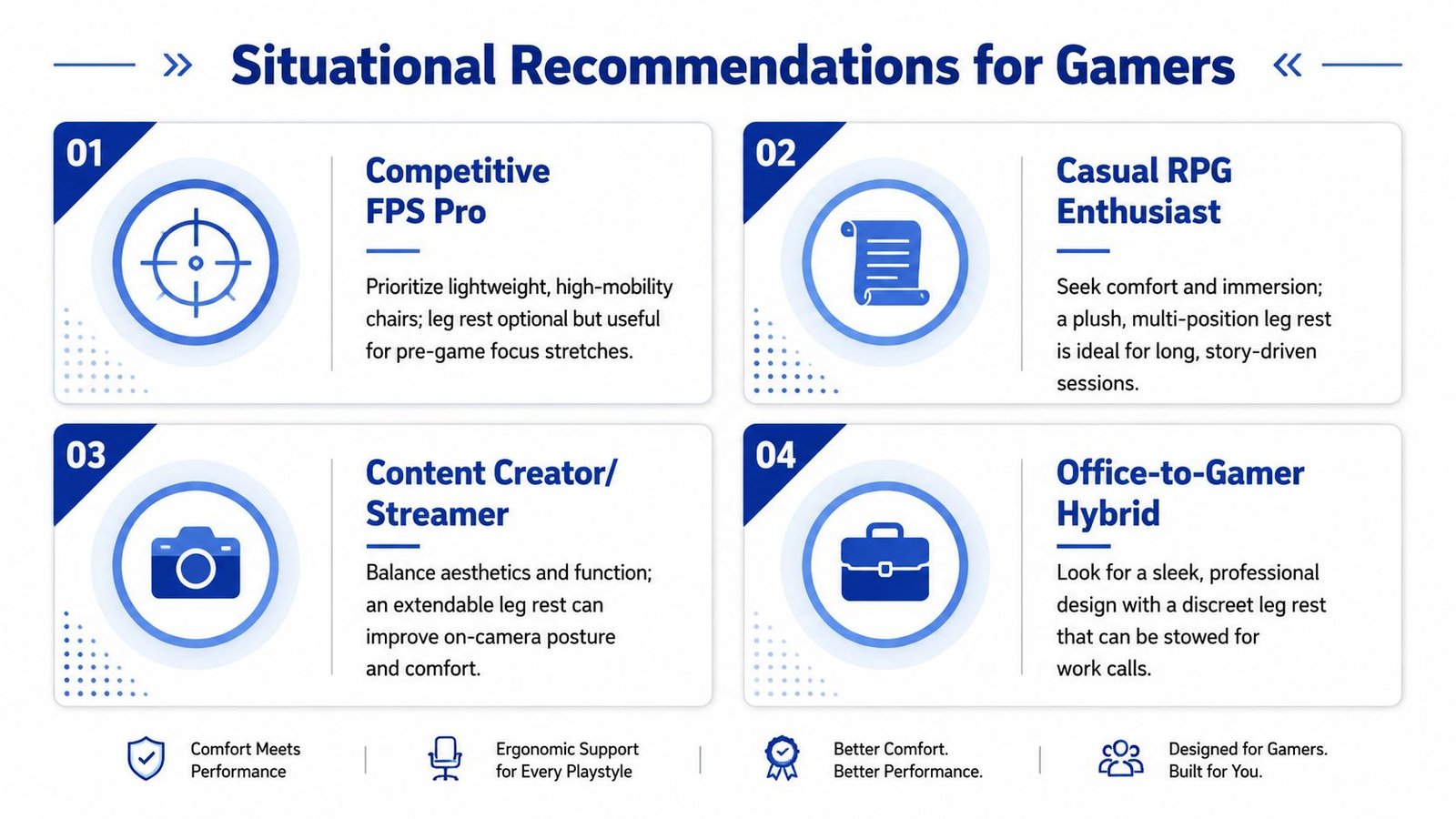
A competitive esports player should not chase the biggest feature list. Upright posture, quick mobility, and low distraction matter more than a foot support that stays folded most of the time. For that buyer, a traditional ergonomic chair or a gaming chair with a retractable rest only makes sense if the rest disappears cleanly and doesn't interfere with the seat when stowed.
Match the chair to the person, not the genre
A casual RPG player is the easiest match for a built-in leg rest. Long sessions, slower pacing, and more frequent lounging make reclined support useful. A streamer sits in a trickier middle ground. The chair needs to look clean on camera, feel comfortable during long broadcasts, and avoid awkward angles when the posture shifts for different content.
A work-from-home gamer should be the most skeptical buyer of all. If the chair has to serve spreadsheets and late-night play, the leg rest has to stow neatly and the chair still needs strong upright support. For that hybrid, a separate footrest may be the better choice because it doesn't force the work setup to become a lounge seat.
Short version: the more upright and task-focused your day is, the less you should pay for a built-in leg rest.
Couples or roommates sharing one chair should also be cautious. Different heights turn a fixed foot support into a compromise nobody loves. In that case, modular support or no leg rest at all is often smarter than arguing with a built-in feature every time someone sits down.
The winner is the setup that fits how you already live. If you recline often, buy for that. If you don't, stop letting the footrest drive the purchase.
Setup Tips and Maintenance for Long-Term Comfort
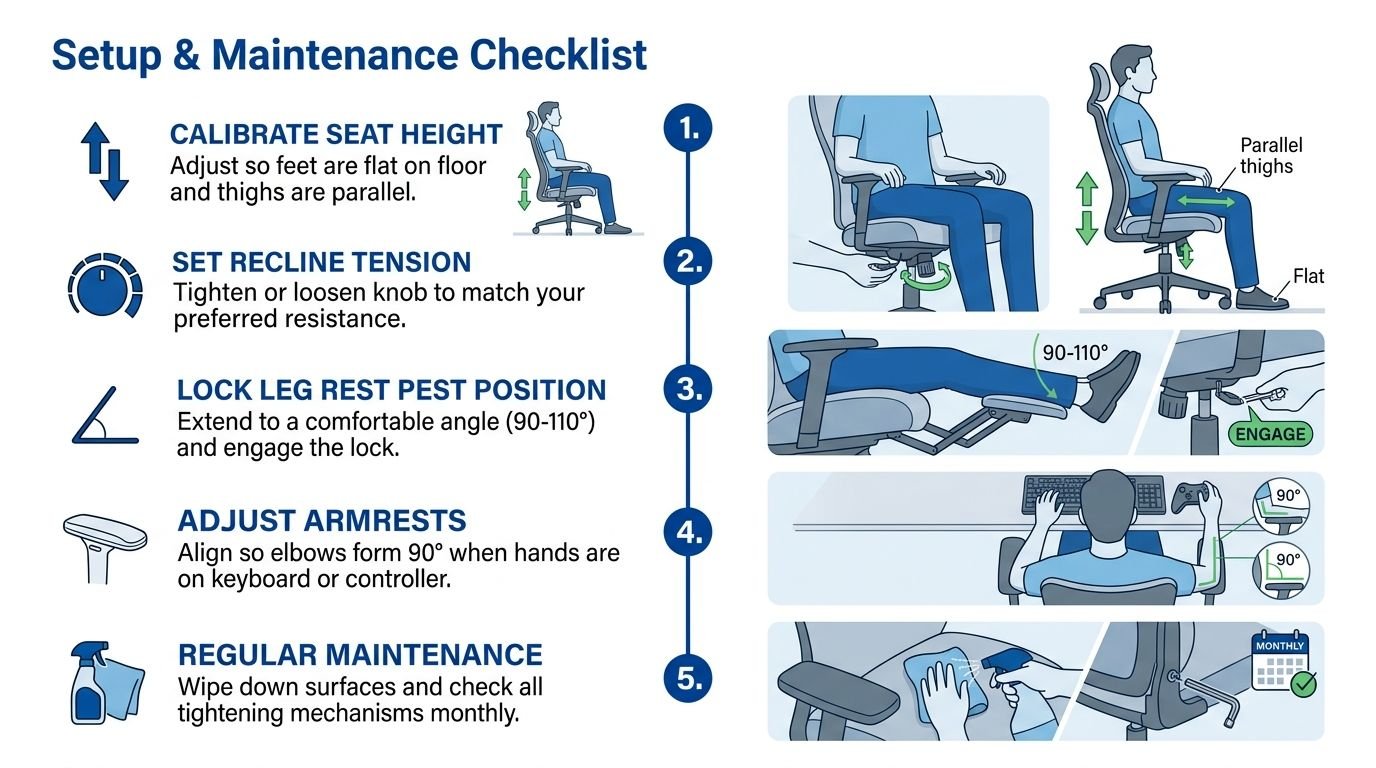
A leg rest only pays off when the chair is adjusted to your body, not just assembled out of the box. Set seat height first. Then tune recline tension so the backrest moves with control instead of flopping backward or resisting every shift. Place lumbar support where your lower back meets the chair, not where the pillow happened to land during unboxing.
Keep the mechanics honest
Leg-rest chairs have more moving parts, so they need more attention. Wipe down high-friction spots, check for looseness around the extension arm, and listen for new play in the hinge or recline mechanism. If the footrest starts to wobble or drag, stop treating it like a minor annoyance. That is usually the first sign the chair is losing the support you bought it for.
PU leather needs regular cleaning because the contact points near the calves and thighs wear faster than the rest of the chair. If your chair uses foam padding, do not sit in the exact same position every session. Shift your posture a bit. That spreads compression and helps the padding keep its shape longer.
Use the chair the way it was designed
When you deploy the leg rest, the rest of the chair has to match it. The seat, back, and armrests should work as one system. If your elbows float too high or the lumbar pillow sits too low, the leg rest is not fixing the setup, it is only making the mismatch feel more tolerable.
Check the fasteners and glide points regularly. If anything starts feeling loose, deal with it early. Chairs rarely fail all at once. They get sloppier first, then noisier, then less supportive.
For more no-nonsense chair comparisons and buying guides, visit DAILY NEWS ORBIT LLC, then use what you have learned here to choose a gaming chair with leg rest that fits your body and your setup.
Powered by the Outrank tool