
Most advice about CRM software for small businesses starts with the wrong question. It asks which platform has the most features, when the actual question is whether your team will use it after the trial ends. If the answer is no, you didn't buy software, you bought a cleanup project.
Small-business CRM adoption is already mainstream in many markets, but usage and actual value are not the same thing. One 2024 summary reported that 71% of businesses with 500 or fewer employees use a CRM system, another found 65% of small businesses with 1 to 50 employees use CRM software, and a separate survey showed only 26% of SMBs had a CRM in their tech stack source. That spread tells you the market is mature enough to tempt everyone, but messy enough that many teams still choose badly. The market itself is also expanding, with one report valuing small-business CRM at USD 10.85 billion in 2025 and projecting USD 25.54 billion by 2035, while another placed it at USD 14.5 billion in 2024 and forecast USD 35.3 billion by 2033 source.
| Platform | Best fit | Main risk |
|---|---|---|
| HubSpot | Inbound-led teams that want a broad starter stack | Costs can climb as you add the features that matter |
| Pipedrive | Sales-led teams that live in pipeline views | Can feel narrow if operations spread beyond sales |
| Zoho CRM | Teams that want depth and flexibility at a lower entry point | The interface can feel crowded |
| monday CRM | Teams that want customization without starting from scratch | Extra complexity can slow adoption |
| Salesforce Starter | Teams that expect to grow into a broader Salesforce ecosystem | Can be more platform than a small team needs |
Table of Contents
- Why Most Small Businesses Buy the Wrong CRM
- Core Features That Actually Matter for Small Teams
- Comparing the Top CRM Platforms for Small Businesses
- Which CRM Fits Your Team Size and Workflow
- Implementation Strategies That Drive Real Adoption
- Making Your Final CRM Decision
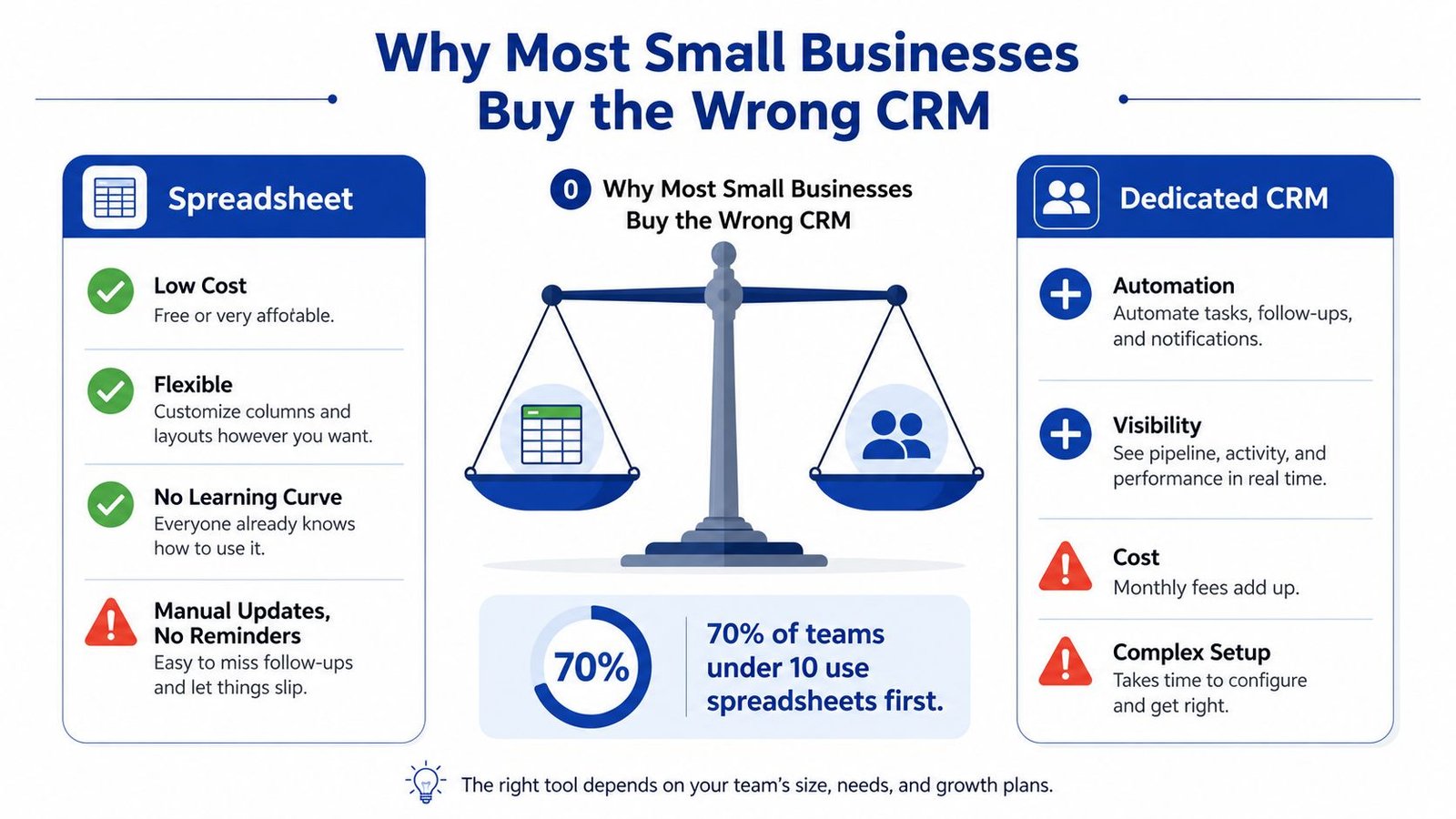
Why Most Small Businesses Buy the Wrong CRM
The biggest mistake is simple. A founder sees a polished demo, hears a promise about automation, and buys for the business they hope to become instead of the one they run today. Then six months pass, and the CRM becomes the place where nobody wants to go.
Overbuying beats almost every other mistake
A small team does not need enterprise baggage just because the vendor's homepage looks ambitious. If your sales motion is still informal, a structured spreadsheet, a shared inbox, or a lightweight pipeline tool may be enough. The moment you force a small team into rigid stages, custom objects, and sprawling dashboards, you turn a helpful tool into a compliance chore.
Practical rule: if your team can't describe its sales process in a few clear steps, you're not ready for a heavy CRM.
The adoption gap matters more than the purchase. One 2025 CRM research report found 70% of businesses believe their CRM is the right size, but only 34% fully embrace and effectively use it, with many teams using less than half of the available features source. That's the part most vendors skip. They sell capacity, while your team needs habit.
The three reasons teams abandon CRMs
First, they buy too much. A small team doesn't use advanced forecasting if it doesn't trust the pipeline data yet. Second, they ignore workflow friction. If logging a call takes longer than making the next call, people stop logging. Third, they underestimate data-entry burden. Every required field is a speed bump, and small teams feel those speed bumps immediately.
That's why the right starting point often looks unglamorous. If you need a place to capture contacts, track stages, and remember follow-ups, a spreadsheet can outperform a bloated CRM because people will update it. Dedicated CRM software earns its keep when two or more people need shared visibility into deals, follow-up ownership, and customer history.
A CRM only helps when the team opens it before they need a reminder to open it.
Who actually benefits from moving now
Repeatable sales processes are the clearest signal. If leads follow a predictable path, if multiple customer touchpoints matter, and if handoffs happen between people, the case for a CRM gets stronger. So does the case for automation, because the business is already doing the same work often enough to benefit from systematizing it.
The wrong purchase usually happens when a business treats CRM like a badge of seriousness. The right purchase happens when the team can say, without hesitation, “we need shared pipeline visibility, and we're willing to use the tool every day.” That's the readiness test. Everything else is marketing.
Core Features That Actually Matter for Small Teams
Small teams don't need a giant CRM feature list. They need a system that reduces memory work, makes the next action obvious, and doesn't force a second round of administrative labor just to stay organized. The daily-use features are boring in the best way, because they do the job without becoming the job.
The daily tier that earns its keep
Start with contact and company records. If a CRM can't store names, emails, notes, and history cleanly, it's not a CRM, it's clutter with a login. Add a deal pipeline that shows stages visually, because small teams need to know what's moving, what's stalled, and who owns the next step.
Email integration is essential for teams. The best setup logs conversations automatically, ties them to the right contact, and keeps the chronology intact without extra copying and pasting. Task reminders matter for the same reason. A team can survive missed reports. It can't survive missed follow-ups.
Here's the filter I use with small clients:
- Contact records: must be easy to update, search, and trust.
- Pipeline view: must show work in motion, not just closed deals.
- Task reminders: must surface the next step without manual chasing.
- Email logging: must happen with minimal effort, ideally automatically.
The features that look useful but often sit idle
Marketing automation sounds impressive, but small teams usually don't need complex branching flows on day one. The same goes for advanced forecasting, territory management, and custom object creation. Those features become useful when the business has enough process maturity to support them, but they also add setup time, decision overhead, and training burden.
AI has entered the buying conversation in a serious way, but the bar is still practical usefulness. In the 2026 comparison review, vendors were weighed on built-in AI, ease of use, sales functionality, pricing for 5 to 50 users, integrations, scalability, and support, which tells you what matters in the world source. For a small team, AI only matters if it removes work you already hate, like drafting follow-up emails or surfacing the next task without a complicated setup.
Good AI reduces clicks. Bad AI adds a settings page.
Integrations and mobile access decide adoption
The must-have integrations are the ones your team already lives in, usually email, calendar, invoicing, and maybe Slack. Anything else is optional until it becomes operationally painful to avoid. Mobile access is also a real dividing line, especially for field teams, because a CRM that works beautifully on desktop but badly on a phone will lose the people who need it most.
A clean, limited system beats a broad one that nobody uses. That's especially true for small teams, where every extra feature competes with selling, serving, or delivering the actual work. If a feature doesn't help someone act faster or remember less, skip it.
Comparing the Top CRM Platforms for Small Businesses
The vendor matters less than fit. A CRM fails when it asks a small team to change how it works just to keep basic records clean. The better choice is the one your team will use every day, without needing a part-time admin to keep it from drifting.
| Platform | Starting Price per User Mo | Free Tier | Email Integration | AI Features | Best For |
|---|---|---|---|---|---|
| HubSpot | Starts at $20 | Yes | Strong, especially for inbound capture and email activity | Broad AI support across content, email, and workspace tasks | Inbound-led teams that want one broad starter stack |
| Zoho CRM | Starts at $20 | Yes | Deep across the suite | Strong AI through Zia, including enrichment, prediction, and analysis source | Teams that want depth and flexibility |
| monday CRM | Starts at $18 with a 3-seat minimum | No free tier mentioned in verified data | Solid, with sequences and campaign support | Built-in AI assistant, notetaker, and agents, but AI credits cost extra | Teams that want a customizable workspace |
HubSpot
HubSpot is the safest pick for inbound-led teams. It connects forms, content, contact records, and follow-up in one place, which keeps the handoff from lead capture to outreach simple. The downside is cost creep. Small teams often start comfortably and then hit paywalls as soon as they need more useful features.
Zoho CRM
Zoho is the value choice for teams that want breadth without jumping into an enterprise system. Its AI layer is stronger than the usual marketing gloss, and source points to Zia handling enrichment, prediction, and analysis. The trade-off is the interface. It can feel busy, and busy software only works when the team is willing to stay disciplined.
monday CRM
monday CRM fits teams that want a CRM shaped around their own process. It works well for groups that already like visual work management, because the interface feels familiar and flexible. The catch is that cost is not just the starting plan. AI credits and add-ons can turn a tidy setup into a pricier one than expected.
If your team is still figuring out its workflow, monday can help you organize it. If your process is already stable, the customization may be more than you need.
What to watch before you buy
Do not get distracted by headline pricing. The question is whether the platform makes everyday work easier or adds extra clicks, extra rules, and extra cleanup. Watch for feature gates, usage limits, and add-ons that change the economics after the trial ends.
A small business does not need a CRM that looks impressive in a demo. It needs one that keeps leads owned, follow-up visible, and customer history in one place. If a platform cannot do that cleanly, skip it.
Which CRM Fits Your Team Size and Workflow
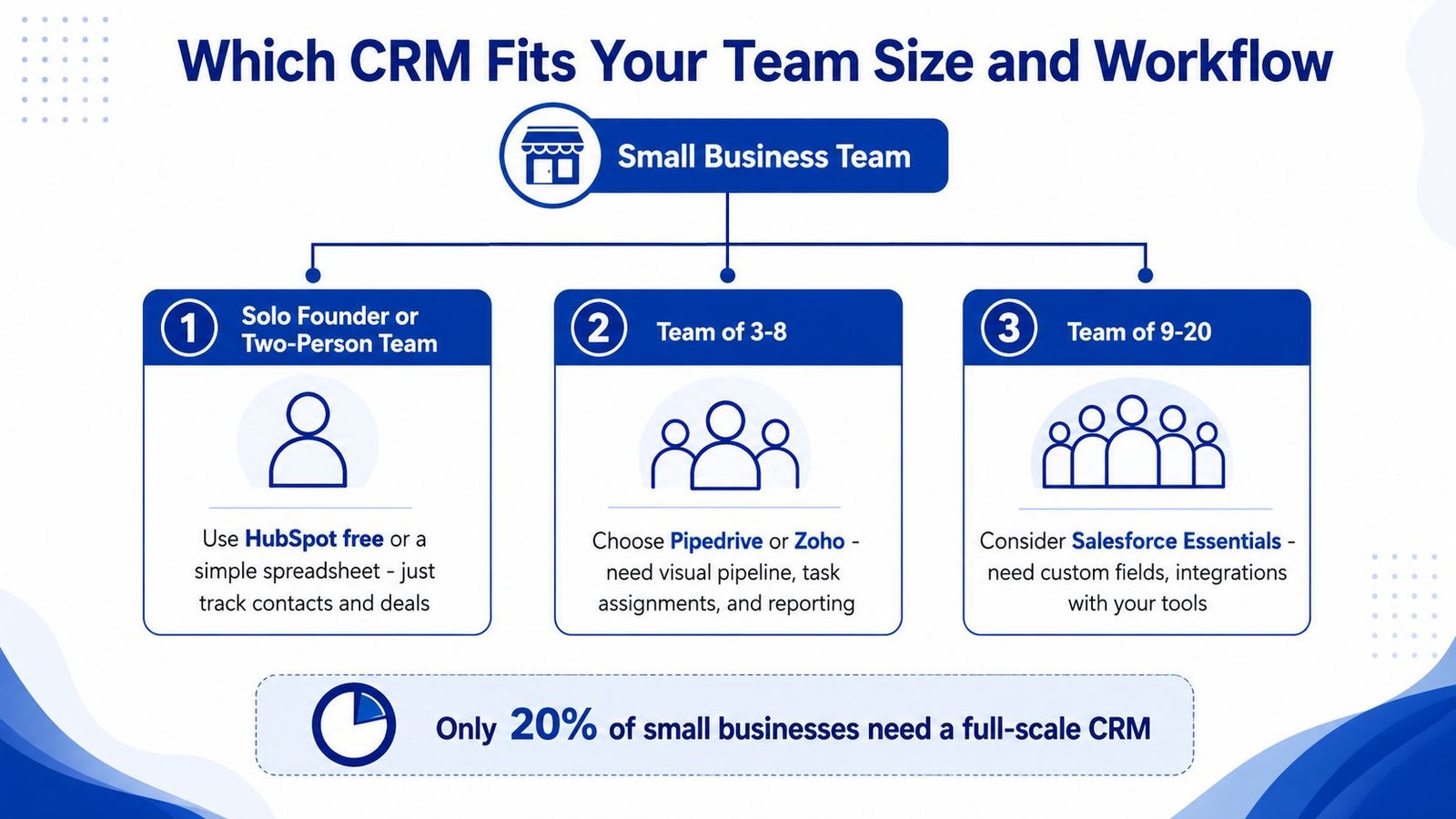
Team size matters, but workflow matters more. A two-person agency, a sales-heavy six-person shop, and a 15-person operation with marketing and support under one roof need very different levels of structure. The mistake is to buy as if everyone's needs are identical.
Solo founders and two-person teams
At this stage, a full CRM is often premature. HubSpot's free tier or a disciplined spreadsheet usually beats a heavier platform because the goal is consistency, not sophistication. If you and one other person can keep the same notes, same status labels, and same follow-up rules without arguing about the tool, that's enough.
The upgrade signal is obvious. When you start losing track of who last replied, when leads sit unowned, or when customer history lives in different inboxes, the lightweight setup stops being adequate. That's when shared visibility becomes more valuable than simplicity.
Teams of three to eight people
This is the sweet spot for a focused CRM. Pipedrive fits teams that think in stages, while Zoho makes sense if you want more structure and broader capability without moving into a monster system. You now need task assignments, pipeline visibility, and enough reporting to tell whether deals are moving.
Readiness shows up in small operational habits. If one person can't take over another person's deal without asking three questions, the team needs a CRM. If the team already uses the same process for prospecting, follow-up, and closing, the CRM will stick faster.
Practical rule: buy for the workflow you already use, not the org chart you expect next year.
Teams of nine to twenty people
Once sales, marketing, and support start touching the same customer record, flexibility matters more than elegance. Zoho CRM or monday CRM can work here because they're better suited to cross-functional usage and custom process design. Salesforce Starter belongs in the conversation only if you're intentionally building toward a Salesforce-centered stack.
The trigger to upgrade is usually coordination, not headcount. When one team's updates affect another team's work, a shared system becomes essential. That's also where poor setup gets expensive, because bad data now spreads across departments instead of staying in one inbox.
The common thread is simple. Don't buy a CRM for the team you'll have in two years if the team you have today can't justify it. Premature adoption is expensive because it hides the cost until people stop using the thing you paid for.
Implementation Strategies That Drive Real Adoption
A CRM rollout usually fails before anyone complains about the software. It fails when the team sees extra work and no clear payoff. Make the system feel like a better version of the process people already use, not a new ritual forced on top.
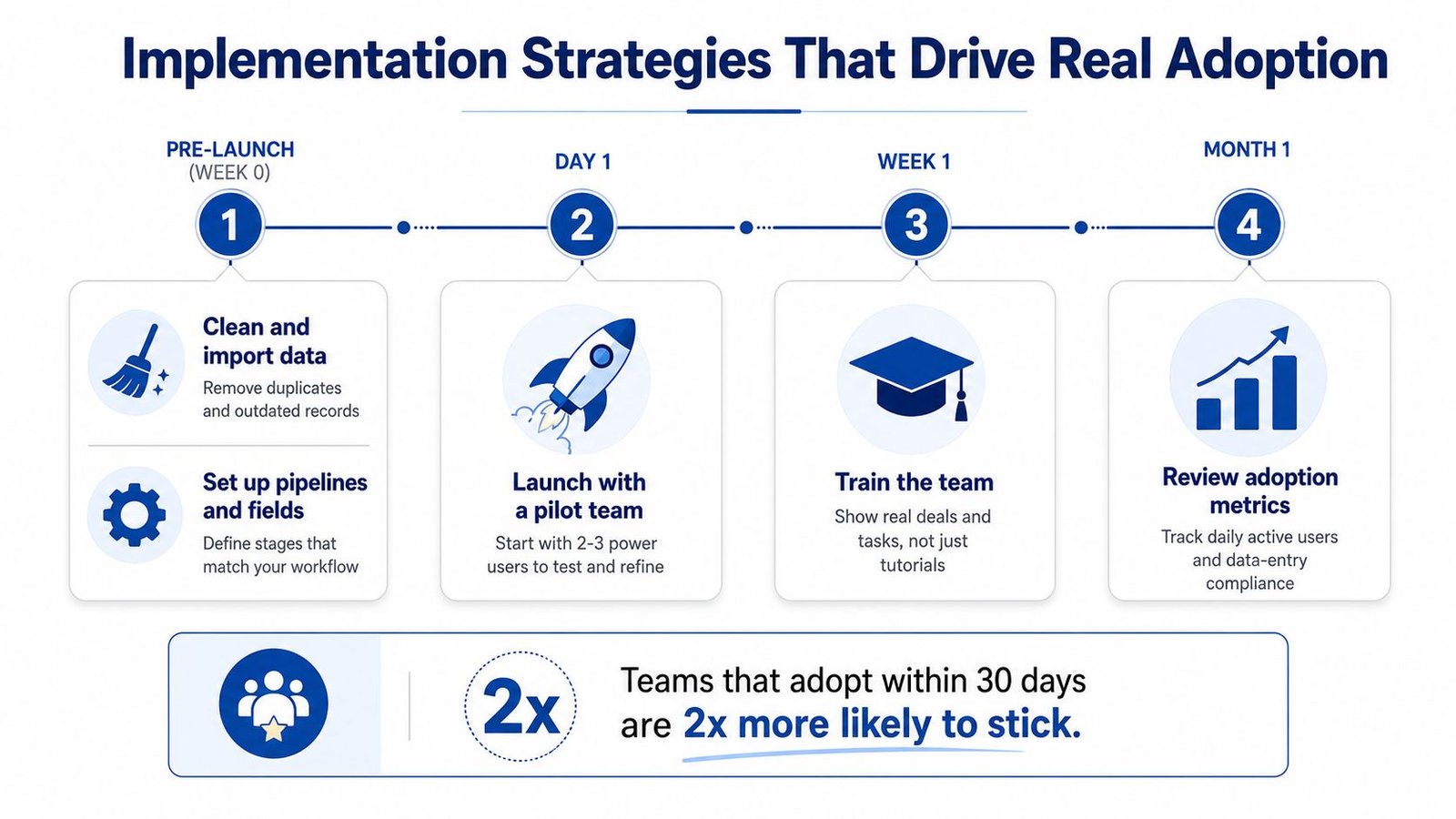
Pre-launch setup
Clean the data before import. Remove duplicates, stale contacts, and dead records, because a messy migration tells people the system cannot be trusted. Define only a few required fields. Capture what matters, not every detail a vendor can force into a form.
Map the workflow the team already follows. If the team already thinks in first contact, qualified lead, proposal, and closed deal, do not invent extra stages just because the software allows it. A tighter workflow is easier to learn and easier to keep using.
Launch with a pilot, not a big bang
Start with a small pilot group, ideally the people who already like tools and do not panic when something changes. Do not make the founder the only champion. If the founder cares but nobody else does, the rollout still fails because the rest of the team will work around it.
Train on live work. Skip the feature tour that sounds impressive and never gets used. Show the team how to update a real record, attach a real email, and move a real opportunity. People adopt tools faster when they can see their actual work inside them.
The first month determines the outcome
Hold short weekly check-ins. Fifteen minutes is enough if the goal is friction removal. Ask what is annoying, what is unnecessary, and what is still being handled in email instead of the CRM. Then cut anything that nobody uses.
Leadership has to model the behavior. If the manager still asks for status in Slack but never checks the CRM, the team gets the message. Mobile usability matters here too, because adoption often dies when the system works on desktop and feels awkward on a phone.
Best practice: if a field or step does not support a decision, delete it.
Expect the system to feel natural only after a real adjustment period. Analysts at source point to that lag, and the teams that stick with it are the ones that reduce friction early and keep the workflow lean.
Making Your Final CRM Decision
The final call should be boring. If you need a broad rule, use this: under five people and a tight budget, start free or stay lightweight; a sales-focused team in the middle needs a pipeline-first CRM; a cross-functional operation needs flexibility more than simplicity. That's the right order, and it saves money later.
If your budget is tight and the team is small, a free-tier tool or a structured spreadsheet buys time. If your team is sales-led and lives by pipeline movement, choose a focused platform instead of a giant suite. If customer work now crosses departments, pick the tool that can hold that complexity without breaking your team's patience.
Before you sign anything, answer these five questions:
- How hard is the migration? If it's a mess, adoption will start behind schedule.
- Can we leave the contract easily? Small businesses need escape hatches.
- Does the mobile experience work? If not, field use will collapse.
- Does it connect to what we already use? Email, calendar, and invoicing matter most.
- Will support answer quickly when things break? Slow help turns frustration into abandonment.
The best CRM is the one your team opens every morning without being nagged. Start a free trial, load real deals, and run a 14-day evaluation with actual users before you commit. If the tool doesn't reduce friction fast, walk away and pick something simpler.
DAILY NEWS ORBIT LLC publishes practical buyer's guides and plain-English software explainers for readers who want clear criteria, not vendor hype. If you're comparing CRM software for small businesses and want more direct guidance like this, visit DAILY NEWS ORBIT LLC for more analysis that helps you choose tools your team will use.
Created with the Outrank app