


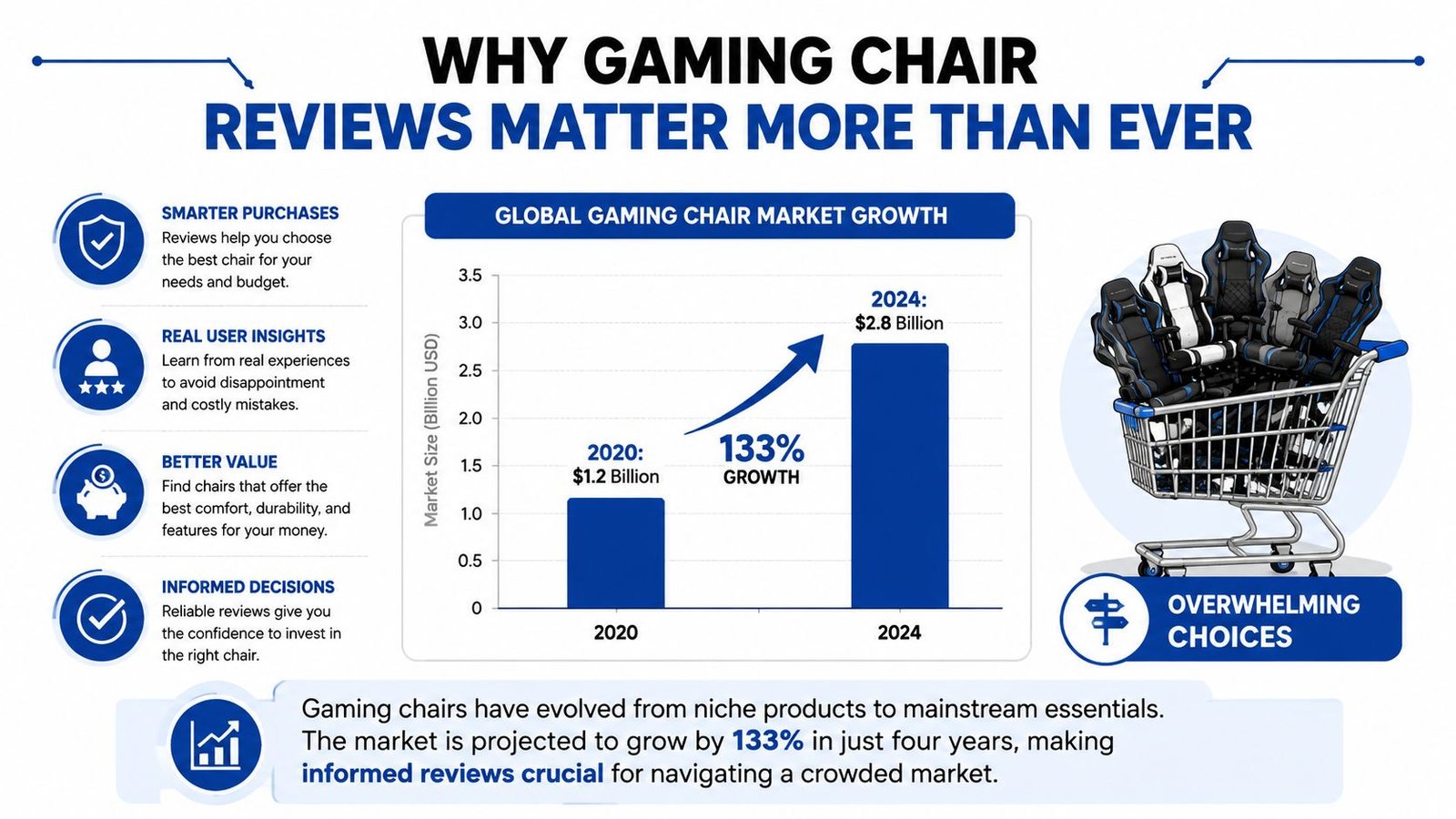
A gaming chair review shouldn't end with “it felt comfortable in the showroom.” The category is now valued at approximately USD 1.65 billion, with a projection of USD 2.56 billion by 2031 at a 7.62% CAGR, according to Mordor Intelligence's gaming chair market estimate. Buyers aren't choosing between a handful of similar seats. They're comparing racing-style buckets, office hybrids, mesh designs, upholstery systems, mechanisms, and marketing promises.
The useful question is therefore not which chair feels softest during the first ten minutes. It's whether the chair keeps your pelvis, lumbar spine, shoulders, and arms in a workable position after your body has stopped forgiving poor geometry. The strongest gaming chair reviews treat comfort as an outcome to investigate, not a score to hand out.
Table of Contents
- Why Gaming Chair Reviews Matter More Than Ever
- Ergonomic Criteria That Actually Protect Your Body
- Comparing Top Gaming Chair Categories and Models
- Real-World Usage Scenarios and Performance Notes
- Durability Testing and Long-Term Ownership Value
- Situational Recommendations for Every Buyer Profile
- Gaming Chairs Versus Ergonomic Office Chairs
Why Gaming Chair Reviews Matter More Than Ever
The modern gaming chair category began with DXRacer's release of the first gaming chair in 2006, according to the historical account summarized by Fortune Business Insights. That origin matters because many designs still carry visual cues from racing seats, including raised side bolsters, pronounced shoulder wings, and deep recline mechanisms. A product can look purpose-built for gaming while offering limited support for the way many users sit at a desk.
The market's scale makes shallow reviews especially risky. The same Mordor Intelligence estimate reports that PC gaming chairs held 46.05% of market share in 2025, PU leather represented 52.12% of upholstery materials, B2C outlets accounted for 71.35% of revenue, and residential use represented 67.42% of demand. These figures identify the key buying contest: home users are comparing materials, retail value, adjustability, and suitability for desk-based sessions, not merely choosing a visual theme.
What a rigorous review measures
A serious test starts with fit. The reviewer should record whether the seat depth lets the user sit back without pressure behind the knees, whether the lumbar support reaches the natural curve of the lower back, and whether the armrests allow the shoulders to relax while the hands reach the keyboard.
The next layer is movement. A chair that supports only one rigid posture may feel secure but become restrictive as the user changes tasks. Recline resistance, seat tilt, armrest movement, and headrest position all influence how the body distributes load.
Practical rule: A chair's first impression tells you about cushioning. A useful review tells you how the chair behaves when your posture changes.
Durability belongs in the same evaluation. PU leather dominates the category's reported upholstery mix, but material share doesn't tell you whether a particular cover will resist peeling, heat, and repeated friction. Reviews should inspect stitching, frame connections, cylinder behavior, caster tracking, and armrest stability instead of treating a heavy appearance as proof of long-term quality.
Finally, measurable evidence should outrank brand language. Consumer Reports evaluates gaming chairs against five criteria aligned with modern ergonomics practices, including the ANSI/HFES 100-2007 standard, as described in its gaming-chair review framework. That approach gives buyers a better filter than plush padding, aggressive styling, or a high recline number.
Ergonomic Criteria That Actually Protect Your Body
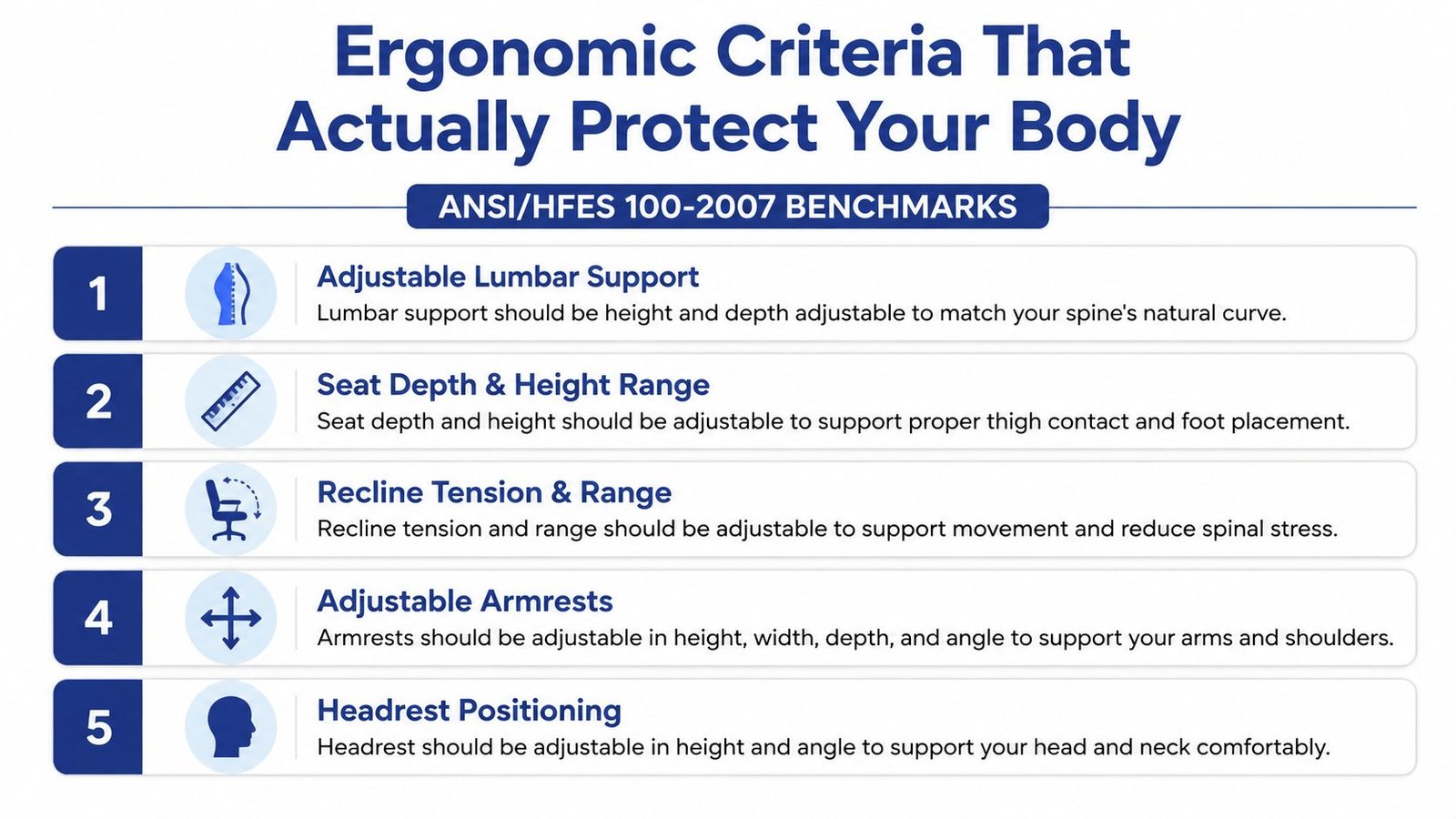
A chair's ergonomic value can be tested through measurable contact points, joint positions, and movement behavior. Consumer Reports' framework identifies five criteria connected with modern ergonomics practices and the ANSI/HFES 100-2007 standard. That reference gives reviewers a consistent method for judging whether a chair can support a neutral working position across different body shapes, rather than rewarding softness or aggressive styling.
Start with the contact points
Lumbar support should contact the lower back at the spine's natural curve. A loose cushion may suit one user, yet shift as the body reclines or changes position. A built-in system with height and depth adjustment lets the reviewer set pressure more precisely and check whether support remains in place during movement.
Seat height and depth control foot stability, thigh support, and contact with the backrest. A pan that is too deep can press behind the knees, encourage the user to slide forward, or leave the lower back unsupported. A short pan reduces thigh contact. Test the seat while sitting fully back, not perched at its front edge.
Armrests require more than vertical adjustment. Height, width, depth, and pivot range affect whether the shoulders remain level or begin to rise. The useful setting supports the elbows while keeping the hands close enough to the keyboard that the user does not reach forward or push the torso away from the desk.
Test the moving parts
Recline tension and range matter because long sessions involve repeated posture changes. A controlled mechanism should let the backrest move without dragging the pelvis forward or lifting the knees sharply. A large recline angle can help with resting or controller play, but the number alone says little about desk posture.
Headrest positioning should support the head and neck without forcing the chin toward the chest. A fixed pillow may contact one user correctly and miss another. Test it upright and reclined, since rotating the backrest changes the point where the head and neck meet the support.
Use this checklist during testing:
- Check spinal contact: Sit fully back and confirm that the lumbar area receives support without a concentrated hard spot.
- Check leg clearance: Look for pressure from the seat edge behind the knees.
- Check shoulder freedom: Place the arms on the rests and verify that the shoulders can drop naturally.
- Check recline behavior: Move through the available range, watching for sliding, sudden resistance, or knee lift.
- Check desk alignment: Test the chair with the actual desk, keyboard, and monitor. A chair can appear well adjusted alone yet place the user's elbows or eyes poorly relative to the workstation.
The useful question isn't “Does this chair feel soft?” It's “Can this chair maintain a workable position when I stop sitting perfectly still?”
Comparing Top Gaming Chair Categories and Models
Gaming chair reviews become more useful when they compare design families instead of pretending every model follows the same philosophy. Racing-style chairs emphasize containment and visual identity. Ergonomic hybrids borrow more heavily from office-chair geometry. Premium mesh-backed designs prioritize airflow and flexible contact.
The table below is a qualitative comparison. Retail pricing changes by model and market, so the price column uses broad positioning rather than invented dollar bands.
Gaming Chair Category Comparison
| Category | Lumbar Support | Breathability | Adjustability | Price Range | Best For |
|---|---|---|---|---|---|
| Racing-style bucket seat | Often cushion-based; built-in support varies | Usually weaker with synthetic leather | Recline and height are common; armrest range varies | Budget to premium | Buyers who prioritize gaming aesthetics and a contained feel |
| Ergonomic hybrid | More likely to include integrated or adjustable lumbar support | Depends on fabric, leather, or mesh panels | Usually broader, especially around arms, seat, and recline | Mid-range to premium | Desk users who game and work in the same chair |
| Premium mesh-back gaming chair | Structured lower-back support can be strong when well fitted | Strongest airflow of the three | Often includes adjustable arms, headrest, and recline controls | Premium | Hot rooms, long sessions, and users who dislike synthetic leather |
| Console recliner | Lower-back support depends on cushion shape | Varies by upholstery | Recline and leg support are the focus | Budget to premium | Console players who sit away from a desk |
Where each category earns its place
Racing-style chairs can offer a familiar, supportive-feeling posture. Their side bolsters may help some users keep a centered position, but those same bolsters can restrict wider sitting positions or contact the shoulders. A review should record whether the side structure supports the user or only narrows the usable seat.
Ergonomic hybrids are the most sensible starting point for buyers who divide time between work and play. Their value comes from reducing compromises. A well-designed hybrid can provide a more neutral upright position for typing, then transition to a relaxed recline without requiring a separate chair.
Mesh designs solve a different problem. They can reduce heat and surface stickiness, especially compared with synthetic leather, but mesh tension and frame edges deserve careful inspection. Breathability doesn't compensate for a seat pan that's too deep or lumbar support that lands in the wrong place.
A comparative study of an Aeron office chair and a commercial gaming chair provides a useful biomechanical counterpoint. After a 2-hour gaming session, the gaming chair showed lower measured muscle stiffness in the mid-thoracic and lumbar regions, including approximately 4.1% less lumbar stiffness and 13.8% less thoracic stiffness, as reported in the published medRxiv study. That result doesn't prove every gaming chair is superior. It shows why category assumptions are weaker than direct testing of lumbar and upper-back load distribution.
Real-World Usage Scenarios and Performance Notes
A chair can pass a showroom test and still fail during the activity that matters most to you. The pressure pattern changes when you lean toward a competitive match, turn toward a second monitor, reach for a controller, or sit through a work task without noticing your posture.

The long gaming session
Heat is often the first failure point. PU leather can feel smooth and easy to clean, but it may trap warmth against the back and thighs. Fabric and mesh usually offer a less sealed contact surface, although their comfort still depends on foam density, tension, and seam placement.
Pressure points appear later than initial discomfort. Side bolsters may seem harmless while sitting upright, then interfere when the user shifts weight or spreads the knees. A useful test includes upright play, forward leaning, relaxed reclining, and movement toward nearby controls.
The hybrid desk setup
Work and gaming ask for different behavior from the same mechanism. Typing favors stable arm support and a seat that keeps the user close to the desk. Controller gaming may reward a deeper recline and head support. The strongest hybrid designs let the user make those changes without losing lumbar contact.
A footrest can be appealing for relaxation, but it shouldn't distract from the upright configuration. If the chair's core position leaves the pelvis sliding forward or the elbows unsupported, the extra accessory solves the wrong problem.
The video below offers a visual reference for the type of gaming setup in which heat, posture, and contact pressure become practical concerns.
The creator's daily routine
Streamers and creators need a chair that remains consistent while the user manages cameras, microphones, controls, and on-screen presentation. A loose armrest or shifting cushion becomes more disruptive when the user repeatedly returns to the same position.
Appearance has a legitimate role on camera, but it shouldn't outrank support geometry. A restrained ergonomic hybrid may look less dramatic than a brightly branded bucket seat while delivering better shoulder clearance and more useful adjustments.
For any high-use setup, test the chair in repeated blocks rather than one uninterrupted sitting. Note where stiffness begins, whether the lumbar support migrates, and whether the user changes position to escape a pressure point. Those observations are more valuable than a generic comfort score.
Durability Testing and Long-Term Ownership Value
The most revealing gaming chair reviews don't stop after assembly. They inspect the parts that carry repeated load: the base, casters, gas cylinder, tilt mechanism, armrest joints, seams, and upholstery. A chair can feel solid on day one while developing wobble, uneven height control, or surface damage after sustained use.
PU leather deserves particular scrutiny because it represented 52.12% of upholstery materials in the Mordor Intelligence market estimate. That share signals popularity, not guaranteed durability. Reviewers should look for clean stitching, protected edges, consistent coating, and areas where clothing or desk contact will create repeated friction.
What to inspect before buying
- Frame connections: Check whether the backrest and seat attach through substantial metal hardware or visibly light brackets.
- Cylinder behavior: Raise and lower the chair repeatedly, listening for rough movement and checking whether height holds steady.
- Caster tracking: Roll across the intended floor surface and watch for drag, sticking, or a base that flexes under movement.
- Armrest stability: Push lightly from different directions. Some movement is normal, but excessive play suggests a weak joint or loose connection.
- Upholstery stress: Examine corners, seams, and exposed edges rather than judging only the center of the seat.
Fabric and mesh have their own maintenance demands. Fabric may hide wear better than glossy synthetic leather but can retain dust and spills. Mesh avoids some heat problems, yet stretched or damaged material can change support characteristics. The right choice depends on the room, cleaning habits, and the user's tolerance for surface wear.
Warranty language also matters. Look for separate coverage terms for the frame, mechanism, upholstery, casters, and armrests. A long headline warranty means less if the parts most likely to fail receive narrower protection.
Calculate ownership value honestly
The cheapest chair isn't necessarily the best value, and the most expensive chair isn't automatically an investment. Compare the purchase price with expected service life, repair availability, replacement-part access, and the cost of buying another chair when a preventable failure appears.
Ownership value comes from the parts you won't need to replace, not from the features you notice during unboxing.
A restrained chair with strong hardware, stable adjustments, and serviceable components can outperform a feature-heavy model that develops wobble or upholstery failure. Reviews should therefore describe wear observations and maintenance needs, not just the first-week sitting experience.
Situational Recommendations for Every Buyer Profile
The right recommendation depends on the user's body, desk, room, and tolerance for trade-offs. A chair that works for a compact console setup may be a poor choice for a tall desk worker. A visually polished model may suit a camera-facing creator but offer little benefit to someone who prioritizes airflow.
Budget-conscious gamer
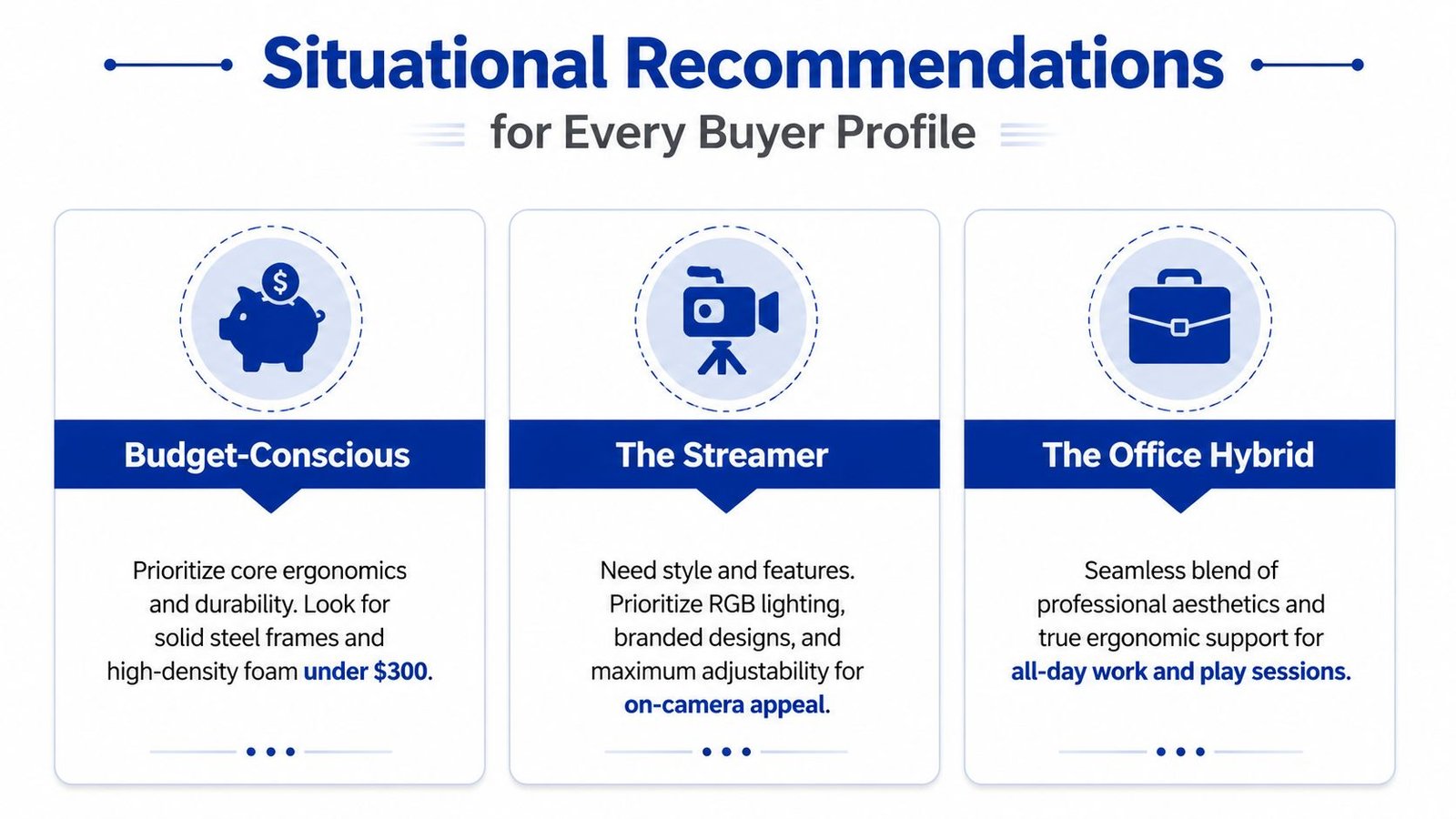
Prioritize seat fit, lumbar placement, and stable height adjustment before footrests, massage cushions, or decorative lighting. A basic racing-style model can work if the bolsters don't restrict your shoulders and the included lumbar cushion stays in place.
The compromise is usually narrower adjustment and less confidence in long-term materials. Inspect the mechanism and return policy carefully. A low purchase price loses its appeal if the chair can't be returned after the user discovers that the seat pan is too deep.
Competitive player
Choose the chair that keeps you close to the desk without pushing your shoulders forward. Adjustable arms, dependable lumbar positioning, and a recline mechanism with controllable tension matter more than extreme recline angles.
Competitive play often involves forward focus and subtle weight shifts. A rigid bucket seat may feel secure at first but can become restrictive if the side structure blocks natural movement. Test the chair while leaning toward the screen, not only while sitting back.
Streamer and content creator
Prioritize a stable visual profile, clean upholstery, quiet movement, and adjustments that let you change position without leaving the camera frame. The chair should look intentional, but lighting and branding shouldn't replace lumbar control or usable armrests.
A mesh-backed design may be harder to match with a dramatic setup, yet it can offer a cooler surface. A fabric or leather hybrid may look more polished on camera while requiring more attention to heat and cleaning.
Office hybrid user
This buyer should start with an ergonomic hybrid or premium mesh-backed chair. Look for a seat that supports upright typing, armrests that align with the desk, a headrest that doesn't force the neck forward, and a backrest that reclines without losing contact.
The trade-off is visual. Office-oriented designs may have fewer gaming cues, but that restraint often reflects a broader adjustment range and less restrictive geometry. For someone who works and plays in the same place, those functions matter more than racing-inspired styling.
Larger-bodied user
Don't infer fit from a chair's appearance. Verify the manufacturer's stated capacity, usable seat width, seat depth, and the position of the side bolsters. A chair can advertise a wide outer frame while leaving a much narrower usable cushion.
Check whether the armrests intrude into the seat and whether the backrest wings contact the shoulders. Fit is a mechanical issue, not a label. If the chair's support elements press against the body, a nominally strong frame won't make it comfortable or stable.
Gaming Chairs Versus Ergonomic Office Chairs
The office-chair comparison cannot be reduced to “gaming chairs are better” or “gaming chairs are harmful.” In a comparative Aeron study, a commercial gaming chair produced lower measured stiffness after a 2-hour gaming session in the tested mid-thoracic and lumbar regions, including approximately 4.1% less lumbar stiffness and 13.8% less thoracic stiffness than the Aeron (medRxiv study details).
The result supports a limited conclusion: some gaming-chair designs may distribute upper-back and lumbar load effectively during extended gaming. It does not show that every racing-style chair suits every body, or that gaming chairs are the better choice for a full workday.
Office chairs commonly provide wider adjustment ranges, more breathable materials, and fewer side bolsters. Gaming chairs may offer deeper recline, integrated head support, stronger lateral containment, and a more defined visual style. Judge those differences against the activity, desk height, and the user's measurements rather than the product category.
Buy the chair that supports your actual posture changes. A gaming chair can be the better tool for one setup, while an ergonomic office chair can be the better tool for another.
Use ANSI/HFES 100-2007-style criteria to compare both categories. Check lumbar position, seat depth, arm support, recline behavior, headrest alignment, and stability over time. A gaming chair that meets those requirements for your body remains ergonomically credible, regardless of its styling. A chair that fails them cannot be rescued by premium branding, thicker padding, or a stronger frame.
Built with Outrank app